

If you feed the same pens day after day, you already know the routine: open Add Feed, click a pen, type the amount, repeat. Most days you're entering a number that's pretty close to yesterday's — or pretty close to the average of the last couple weeks. So why type it from scratch?
We just shipped a small change that pays off every single feed. The old "Set to yesterday" checkbox is gone. In its place: a dropdown with four ways to pre-fill the Amount to feed box the moment you click a pen.
Here's how each one works and when to use it.
The new dropdown — four methods
Open Feed → Add Feed, click a pen, and look just below the Amount to feed box. You'll see Pre-fill method dropdown box:

Pick the method that matches how your operation. Your choice is saved per user, so it sticks the next time you log in.
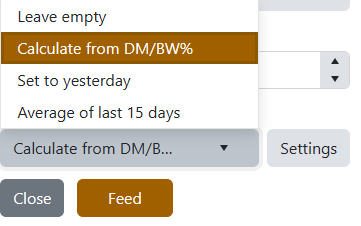
1. Leave empty
The box stays blank. Best for cattle managers who like to think before they type and don't want a number influencing their gut.
2. Calculate from DM/BW% (default)
The classic formula: Pen Weight × DM/BW% ÷ Ration DM%. Use this when you want a textbook-correct starting point based on body weight and ration density.
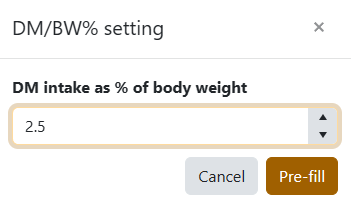
Click Settings to adjust your DM/BW% factor (the percentage of body weight you target as dry matter intake). Default is 2.5%. Change it once, and every pen you click recalculates with the new factor.
3. Set to yesterday
Copies the total amount fed to that pen yesterday. Perfect for established lots on a steady where you nudge up or down by a small amount most days. (Yes — this is the option long-time users were already using.)
4. Average of last 15 days
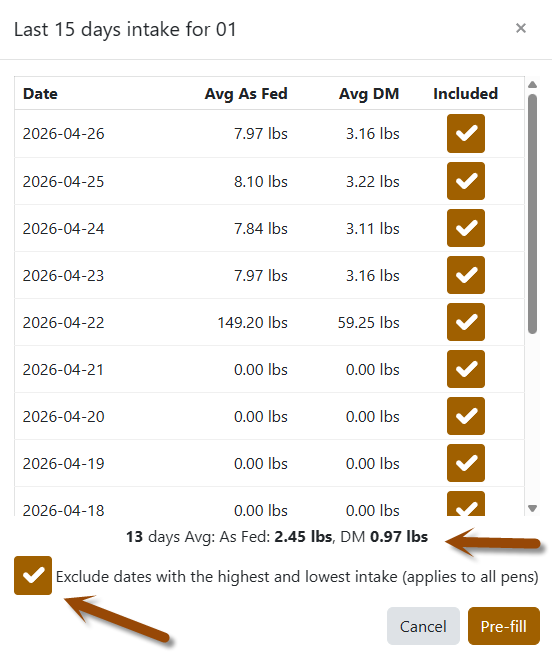
The new headliner. Looks at the last 15 days of feed history for that pen and pre-fills the average daily intake × current head count. Smooths out one-off spikes and dips that "yesterday" can amplify after a storm or a missed feed.
Click Settings here to open a calendar view:
- Date / Avg As Fed / Avg DM / Included — uncheck any day you want to leave out (sick day, weather event, scale was off, etc.). Your selections re-average on save.
- Exclude dates with the highest and lowest intake (applies to all pens) — a one-click way to throw out outliers across every pen, every time. Set it once and forget it.
Walk between pens without losing your place
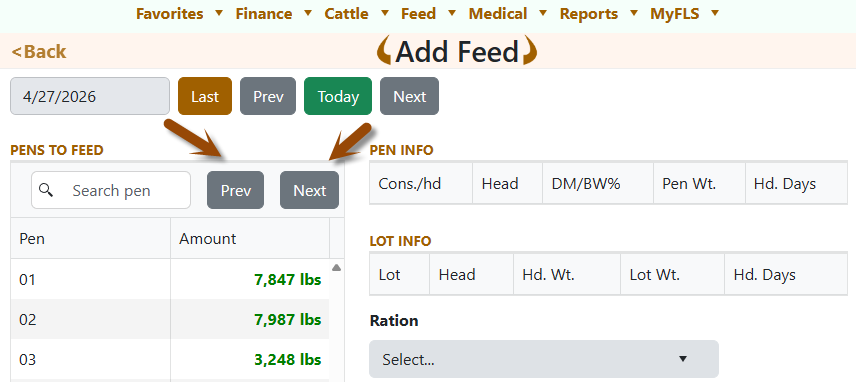
While you're at it, notice the new Prev and Next buttons in the Pens to feed search bar. Click through your pens in order without scrolling and re-clicking the grid. Each click reapplies your chosen default method — so if you're on Average of last 15 days, every pen you land on gets pre-filled instantly.
Press Page Up to go to the previous pen, and Page Down to go to the next pen.
Press Arrow Up to increase the Amount to Feed by 10 lbs, and Arrow Down to decrease it by 10 lbs.
Press Enter to feed.
A note on units and DM column
- The Avg As Fed and Avg DM values in the settings grid show your operation's display unit (lbs or kgs).
- Avg DM is shown for reference only — calculations always use Avg As Fed so the number you see is the number that lands in the box.
Three-second recommendation
| If you... | Pick... |
|---|---|
| Manage cattle on tight nutrition specs | Calculate from DM/BW% |
| Run a stable feed day to day | Set to yesterday |
| Want a robust intake that ignores noise | Average of last 15 days |
| Prefer to drive manually | Leave empty |
Try changing method for a couple of feed and see which feels right for your operation. The choice is per-user, so different members of your crew can each have their own default.
Not using FLS Cloud yet? Feedlot Solutions provides the most comprehensive, cloud-based management software for the modern beef producer. From inventory and health records to precise feed billing and custom reporting, we help you measure it so you can manage it.
Click here to schedule a demo.
Keywords: Feedlot management software, feedlot record keeping, custom feedlot billing, cattle closeout reports, feedlot closeout, cattle performance analysis, ration tracking, feed inventory, yardage billing, cattle health records, feedlot accounting, custom feeding software, grain bank, cattle medical, cattle inventory, cattle movements, cattle tag management, average daily gain, ADG, dry matter intake, DMI, feed conversion ratio, FCR, feed efficiency, gain efficiency, cost of gain, COG, break even analysis, cattle closeout report, pen closeout, lot closeout, group closeout, feedlot closeout report, cattle profit loss, cattle margin analysis, cattle weight gain tracking, cattle average weight, cattle shrink, cattle days on feed, DOF, cattle projected finish date, feed management software, feed inventory software, feed tracking software, feed delivery records, feed consumption tracking, feed cost tracking, feed ingredient inventory, ration management, ration tracking, ration formulation, ration cost, ration changes, ration history, daily feed records, feed bunk management, bunk reading, feed call, feed sheets, feed tickets, feed usage reports, ingredient usage, feed mixing records, TMR records, total mixed ration, feed truck records, feed scale integration, scale head data import, Cattle accounting software, feedlot accounting software, cattle billing software, cattle invoice software, feedlot invoice, feedlot customer billing, owner billing, cattle owner statements, yardage billing, feed billing, medicine billing, processing charges, transportation charges, trucking charges, cattle purchase expense, cattle sale settlement, feedlot receivables, feedlot payables, feedlot financial reports, cattle cost reports, cattle expense reports, feedlot profitability
Comments