

.png?width=1448&height=1086&name=Feedlot%20Solutions%20(33).png)
4 minute read
Most ration ingredients scale with the size of the mix. If corn makes up 62% of a ration, the amount of corn changes whenever the load changes.
Many additives work differently. They are prescribed as a fixed amount for each animal—not as a percentage of the truckload. With Per-Head Additives in FLS Cloud, you enter the rate your cattle are supposed to receive, and FLS calculates the amount required for the pen.
Where to set it up
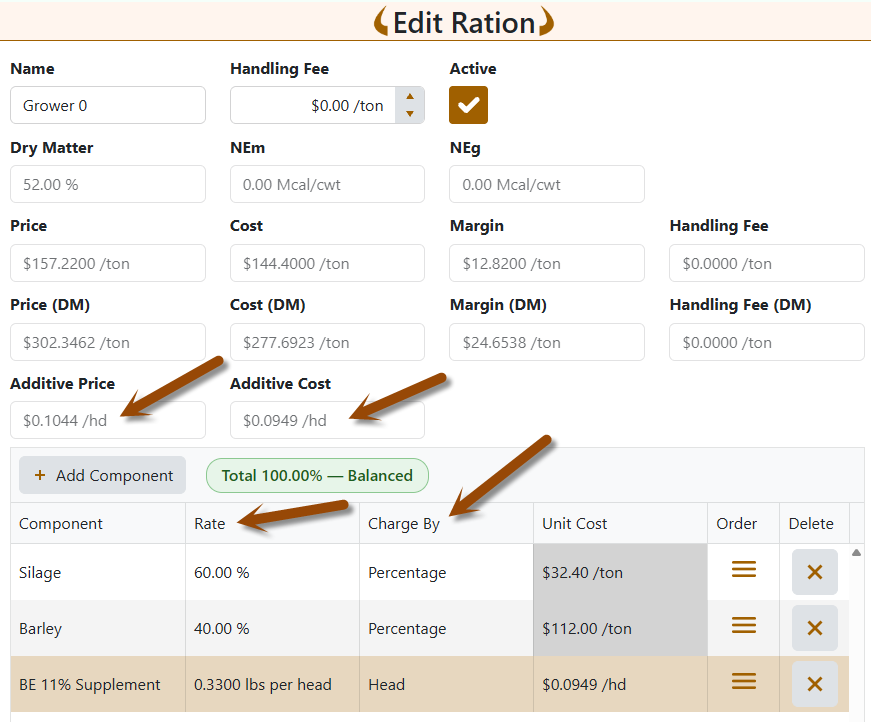
Per-Head Additives are available when adding or editing a ration on desktop and mobile.
On the desktop ration screen, each component now has two clearly labeled columns:
- Rate shows the entered value together with its unit.
- Charge By identifies whether the component is calculated by Percentage or by Head.
Choose Percentage for ordinary ration ingredients. Choose Head for an additive, then enter the required pounds or kilograms per head.
On mobile, use the Unit control to switch between % and lbs per head or kgs per head. The input label changes from Percentage to Rate when the component is charged by head.
No separate additive setup screen is required.
Small rates no longer disappear
Micro-ingredient rates can be much smaller than one hundredth of a pound. Showing every value with only two decimal places can make a valid dose look like zero.
The desktop ration grid now displays per-head additive rates to four decimal places. For example:
0.0005 lbs per head
Percentage components continue to display two decimal places, keeping ordinary ration rows easy to read.
The load sheet uses the precision appropriate for the work being performed:
- Additive rates display to four decimal places.
- Additive amounts to load display to two decimal places.
- Percentage-component amounts remain in whole pounds or kilograms.
- Cumulative scale readings remain whole units.
For example, 84 head at 0.0005 lbs per head requires 0.042 lbs. The additive target displays as 0.04 lbs instead of being rounded away to zero.
Setting up an additive
- Add the component to the ration.
- In Charge By, select Head.
- Enter the rate in pounds or kilograms per head.
- Confirm that the remaining percentage components total 100%.
When you change a row between Percentage and Head, FLS clears the existing value. This prevents a value such as 25% from being accidentally reused as 25 lbs per head.
Per-head additives are not included in the ration’s 100% calculation. A ration containing 100% regular ingredients plus a per-head additive is still properly balanced.
How FLS calculates the load
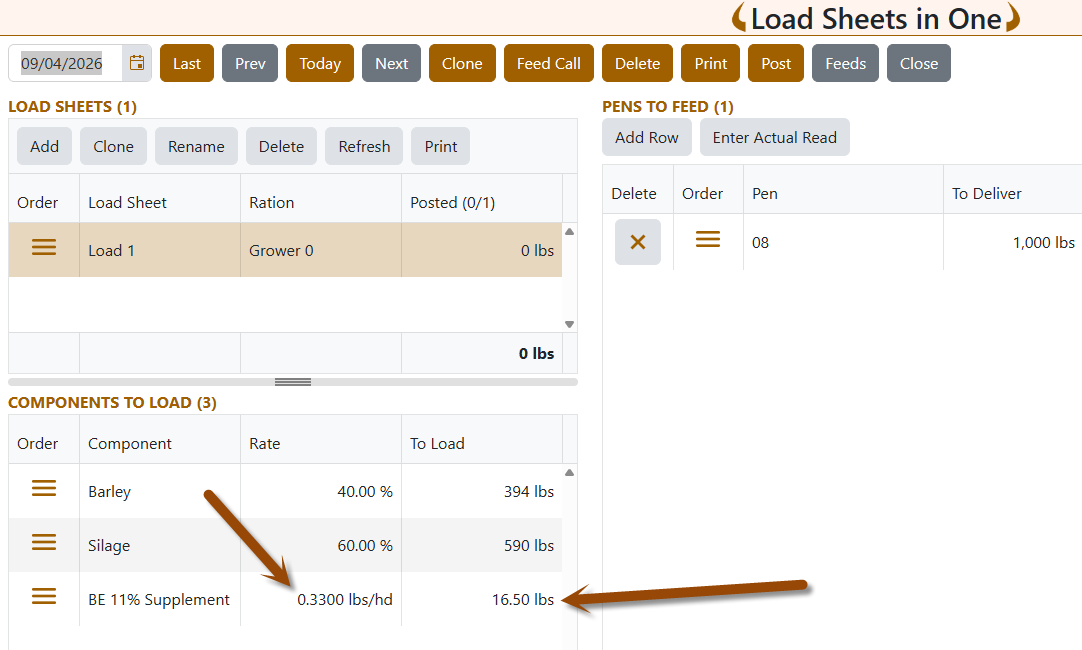
For a per-head component, the starting calculation is:
Head count × Per-head rate
If a pen has 95 head and the additive rate is 1 lb per head, the pen requires 95 lbs of that additive.
The additive amount is taken from the total load first. The remaining weight is then distributed among the percentage components. This keeps the component total aligned with the amount actually being loaded and posted.
If the requested additive amount is larger than the entire load, FLS limits the additives to the available load. When multiple additives are involved, they are reduced proportionally, and percentage components receive zero. Component totals will not exceed the amount posted.
Multiple load sheets for the same pen
When the same pen is divided across multiple load sheets on the same date, FLS divides one per-head dose among those sheets according to the amount each sheet delivers.
For example, suppose a 95-lb additive dose is divided between two loads delivering 1,200 lbs and 1,000 lbs to the pen:
- The 1,200-lb delivery carries approximately 51.82 lbs of additive.
- The 1,000-lb delivery carries approximately 43.18 lbs.
- Together, they deliver the required 95.00 lbs.
If part of the additive has already been posted, that recorded amount is preserved. The remaining unposted sheets divide only what is still due.
A load sheet using the same component as an ordinary percentage ingredient does not participate in the per-head split. Only rations that classify the component as a per-head additive are included.
Add Feed and feed import records
Manual Add Feed, the Feed Importer, and the Daily/Monthly Feed Sheet treat each saved feed record as a separate feeding.
Each record receives its full per-head calculation. Therefore, entering two separate feedings for the same pen on the same day creates two doses. This is different from dividing one planned feeding among multiple load sheets.
Clearer costs and prices
Percentage ingredients continue to show their unit cost per ton or tonne.
Per-head additives show their cost per head instead. Because these values can be very small, the ration grid displays additive unit costs to four decimal places, such as:
$0.0025 /hd
The ration summary also presents Additive Price and Additive Cost separately as daily per-head values. They remain outside the ration’s per-ton price and cost so the additive is not counted twice.
Load sheets and reports
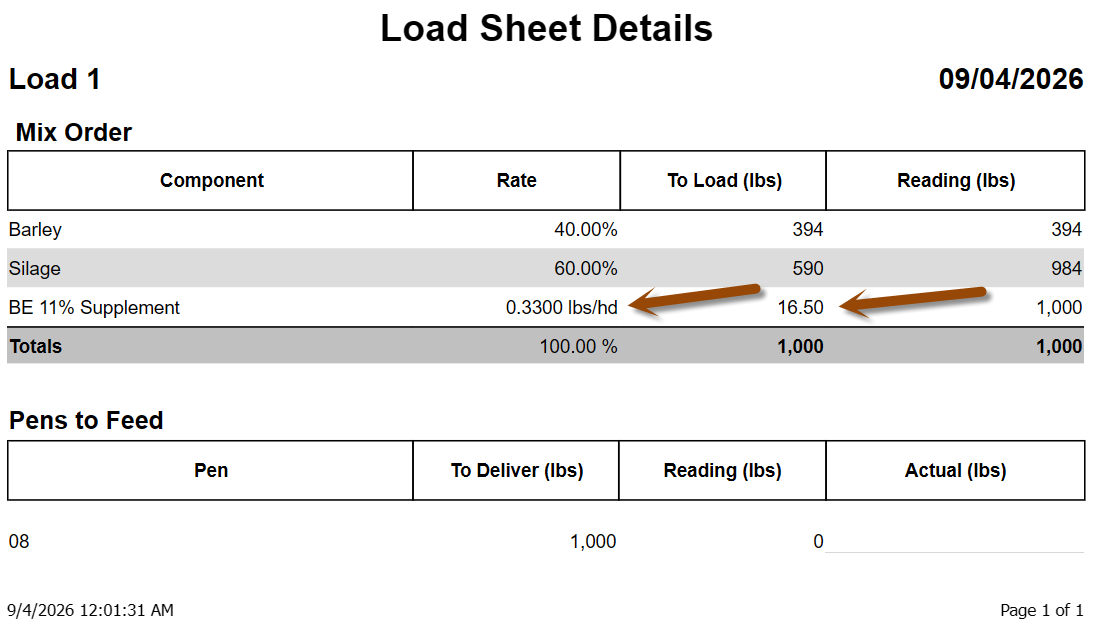
The same precision and labels now carry through the feeding workflow:
- Load sheet component grids show the additive’s per-head rate instead of an incorrect-looking
0.00%. - Additive targets display to two decimal places.
- Printed Mix Orders use a Rate column and show the per-head unit.
- Mix Orders retain two decimal places for additive quantities.
- Lot Component Usage reports retain fractional additive amounts instead of rounding them to zero.
This keeps the ration screen, load screen, printed instructions, inventory records, and billing records consistent.
Important safeguards
- A per-head rate greater than 1 lb or kg asks for confirmation.
- A per-head component cannot be saved without a positive rate.
- A ration must still contain percentage ingredients totaling 100%; it cannot consist only of additives.
- Load-rounding increments continue to apply to percentage components. Additives use two-decimal target amounts instead.
- Negative feed entries cannot reverse a ration containing per-head additives. Delete the original Pen Feed record so FLS can reverse the exact component amounts originally recorded.
- For CNE feedlots, the additive’s own energy is not included in the CNE gain calculation. If the component supplies meaningful energy rather than functioning as a true micro-ingredient, compare the calculated performance with actual scale weights.
Available in FLS Cloud
Per-Head Additives are available in FLS Cloud on desktop and mobile at no additional cost. The latest improvements make small additive rates easier to enter, read, load, report, and bill accurately.
If an existing ration currently approximates an additive as a percentage, edit the ration, change Charge By to Head, and enter the correct per-head rate.
.
Not using FLS Cloud yet? Feedlot Solutions provides the most comprehensive, cloud-based management software for the modern beef producer. From inventory and health records to precise feed billing and custom reporting, we help you measure it so you can manage it.
Click here to schedule a demo.
Keywords: Feedlot management software, feedlot record keeping, custom feedlot billing, cattle closeout reports, feedlot closeout, cattle performance analysis, ration tracking, feed inventory, yardage billing, cattle health records, feedlot accounting, custom feeding software, grain bank, cattle medical, cattle inventory, cattle movements, cattle tag management, average daily gain, ADG, dry matter intake, DMI, feed conversion ratio, FCR, feed efficiency, gain efficiency, cost of gain, COG, break even analysis, cattle closeout report, pen closeout, lot closeout, group closeout, feedlot closeout report, cattle profit loss, cattle margin analysis, cattle weight gain tracking, cattle average weight, cattle shrink, cattle days on feed, DOF, cattle projected finish date, feed management software, feed inventory software, feed tracking software, feed delivery records, feed consumption tracking, feed cost tracking, feed ingredient inventory, ration management, ration tracking, ration formulation, ration cost, ration changes, ration history, daily feed records, feed bunk management, bunk reading, feed call, feed sheets, feed tickets, feed usage reports, ingredient usage, feed mixing records, TMR records, total mixed ration, feed truck records, feed scale integration, scale head data import, Cattle accounting software, feedlot accounting software, cattle billing software, cattle invoice software, feedlot invoice, feedlot customer billing, owner billing, cattle owner statements, yardage billing, feed billing, medicine billing, processing charges, transportation charges, trucking charges, cattle purchase expense, cattle sale settlement, feedlot receivables, feedlot payables, feedlot financial reports, cattle cost reports, cattle expense reports, feedlot profitability
Comments