

.png?width=1448&height=1086&name=Feedlot%20(3).png)
Need to send a customer several invoices at once? Until now, that meant opening and downloading each invoice PDF one at a time, then attaching a stack of files to your email. Tedious — and easy to miss one.
Now you can combine them into a single PDF in just a few clicks.
How It Works
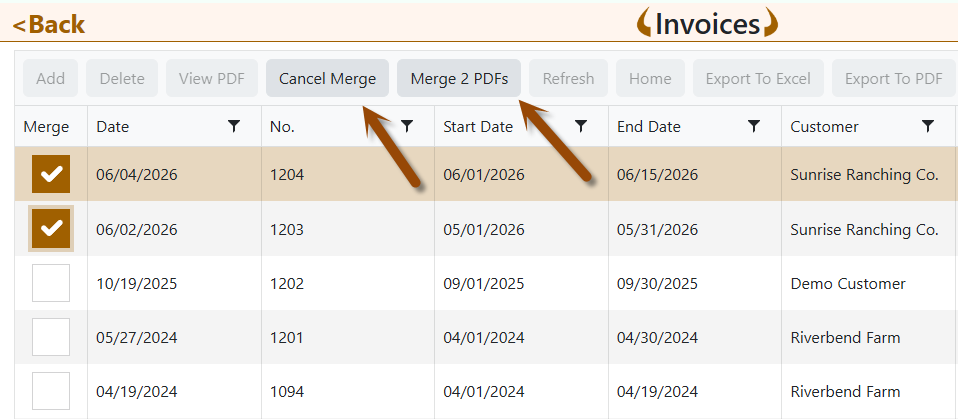
On the Invoices list, you'll see a new Merge PDFs button:
- Click Merge PDFs. A checkbox column appears next to your invoices.
- Check the invoices you want to combine (pick two or more — across pages is fine).
- Click Merge N PDFs (it shows how many you've selected).
- One tidy PDF downloads, ready to print or email.
Done? Click Cancel Merge anytime to go back to the normal view.
Why This Matters
- One file, one email. Send a customer all their invoices as a single attachment.
- Faster. No more downloading and juggling separate files.
- Nothing changes on your invoices. Merging only combines saved copies — your invoice numbers and amounts stay exactly as they are.
Ready to Try It?
Head to Finance → Invoice List, click Merge PDFs, and give it a spin.
Not using FLS Cloud yet? Feedlot Solutions provides the most comprehensive, cloud-based management software for the modern beef producer. From inventory and health records to precise feed billing and custom reporting, we help you measure it so you can manage it.
Click here to schedule a demo.
Keywords: Feedlot management software, feedlot record keeping, custom feedlot billing, cattle closeout reports, feedlot closeout, cattle performance analysis, ration tracking, feed inventory, yardage billing, cattle health records, feedlot accounting, custom feeding software, grain bank, cattle medical, cattle inventory, cattle movements, cattle tag management, average daily gain, ADG, dry matter intake, DMI, feed conversion ratio, FCR, feed efficiency, gain efficiency, cost of gain, COG, break even analysis, cattle closeout report, pen closeout, lot closeout, group closeout, feedlot closeout report, cattle profit loss, cattle margin analysis, cattle weight gain tracking, cattle average weight, cattle shrink, cattle days on feed, DOF, cattle projected finish date, feed management software, feed inventory software, feed tracking software, feed delivery records, feed consumption tracking, feed cost tracking, feed ingredient inventory, ration management, ration tracking, ration formulation, ration cost, ration changes, ration history, daily feed records, feed bunk management, bunk reading, feed call, feed sheets, feed tickets, feed usage reports, ingredient usage, feed mixing records, TMR records, total mixed ration, feed truck records, feed scale integration, scale head data import, Cattle accounting software, feedlot accounting software, cattle billing software, cattle invoice software, feedlot invoice, feedlot customer billing, owner billing, cattle owner statements, yardage billing, feed billing, medicine billing, processing charges, transportation charges, trucking charges, cattle purchase expense, cattle sale settlement, feedlot receivables, feedlot payables, feedlot financial reports, cattle cost reports, cattle expense reports, feedlot profitability
Comments