

.png?width=1448&height=1086&name=Feedlot%20(5).png)
Recording expenses shouldn't mean picking the same lot, the same date, and the same category over and over — once for the vaccine, again for the ear tags, again for the feed additive. If your invoice has eight line items, that's eight round trips through the same form.
Not anymore. Two new screens — Add Lot Expenses in Bulk and Add Pen Expenses in Bulk — let you enter the shared details once, then fly through as many items as you need in a single grid. One Save, and every line is recorded.
How to launch them
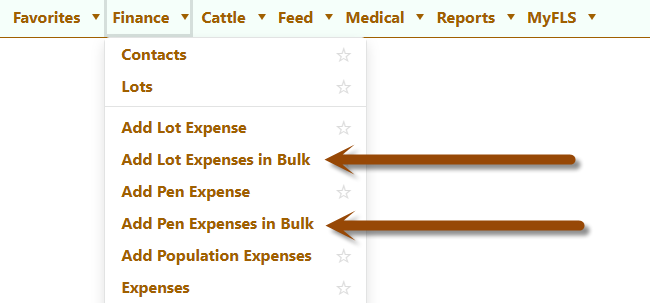
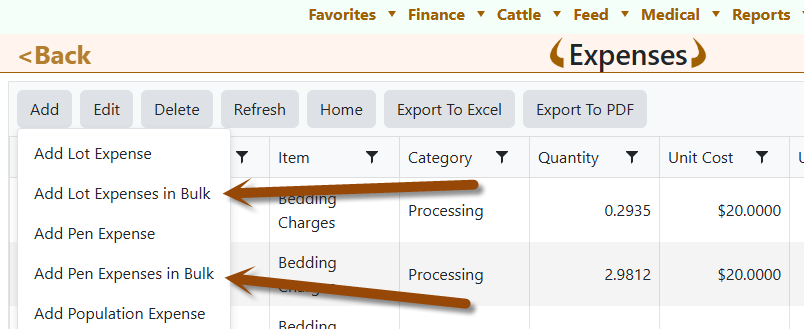
You'll find both screens in two places:
- Finance menu → Add Lot Expenses in Bulk or Add Pen Expenses in Bulk
- Finance → Expenses → the Add button → pick the bulk option you need
How it works
- Set the header once. Pick the Date, the Lot (or Pen), and the Category at the top of the screen. As soon as you pick a group, its live head count appears right next to the label — 624 head — so you can confirm you've got the right cattle before entering a single number.
- Pick your first item. Select an item in the grid and FLS fills in the rest — the unit and the price per unit come straight from your item list. The cursor jumps to Quantity automatically.
- Confirm the quantity. Here's the time-saver: Quantity is pre-filled with the head count of the selected lot or pen. Dosing one per animal? Just press Enter or Tab. Buying by the bag or the ton? Type over it and move on.
- Confirm the price, press Enter or Tab again. The price per unit is already filled from your item setup, so most of the time you just confirm it. FLS then moves you to the next row and opens the item list, ready for your next pick — on the last row, it adds a fresh row for you, quantity already filled. Select an item, Enter, Enter — that's the whole rhythm. Both hands stay on the keyboard.
- Watch the total build. Each row shows its own total price, and the grid footer keeps a running grand total, so you can check it against the invoice in your hand before saving.
- Save — or Continue. Save records every row and returns you to the Expense list. Continue records every row, clears the grid, and keeps the date, so you can immediately start the next batch for a different lot or pen.
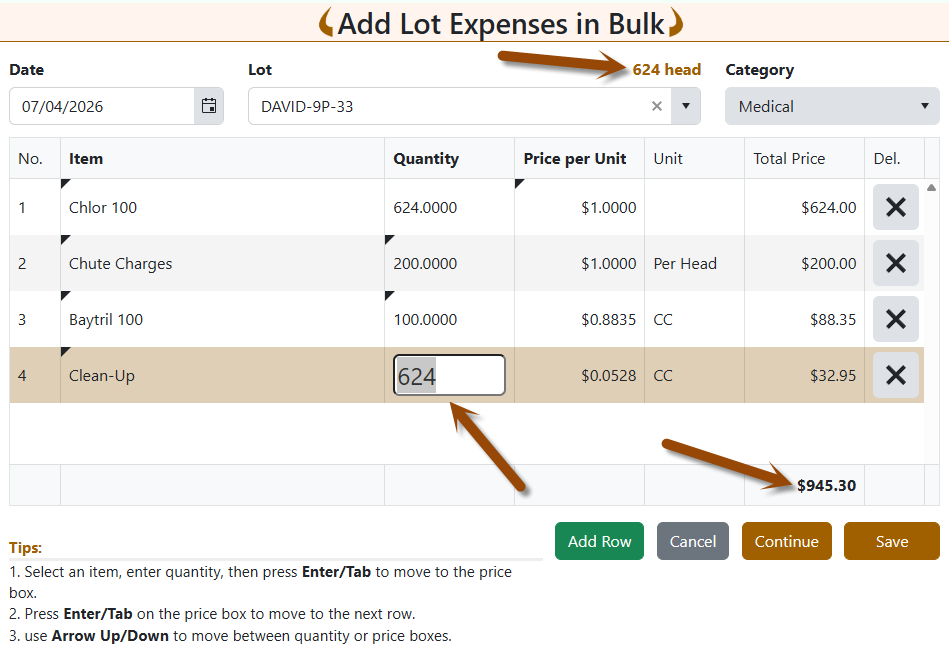
A few more touches worth knowing: use Arrow Up / Down to hop between quantity or price boxes across rows, click Add Row to append rows anytime, and hit the × on any row to remove it.
The pen version knows about your lots
Add Pen Expenses in Bulk adds one extra choice in the header: Split by. When a pen holds cattle from more than one lot, FLS automatically allocates each expense across those lots — by Weight or by Head, whichever you choose. Same fast entry, and the lot-level accounting takes care of itself.
Built-in guardrails
Bulk entry is only faster if it's also safe. Both screens check your work before anything is saved:
- Every row is validated — missing items, prices below cost, and out-of-range dates are flagged with the exact row number so you can fix them in seconds.
- The whole batch saves as one transaction. If any row can't be recorded, nothing is — you'll never end up with half an invoice in the system.
- Item inventory is reduced per line, exactly as if you had entered each expense individually.
Same numbers, fewer clicks
Under the hood, these screens use the exact same expense logic as the single-entry forms you already trust — the same validations, the same cost tracking, the same invoiced-period protection. The only thing that changed is how fast you can get through the pile of receipts on your desk.
Give it a try on your next multi-line invoice. And if you'd like a walkthrough for your crew, reach out — we're happy to set up a quick demo.
Not using FLS Cloud yet? Feedlot Solutions provides the most comprehensive, cloud-based management software for the modern beef producer. From inventory and health records to precise feed billing and custom reporting, we help you measure it so you can manage it.
Click here to schedule a demo.
Keywords: Feedlot management software, feedlot record keeping, custom feedlot billing, cattle closeout reports, feedlot closeout, cattle performance analysis, ration tracking, feed inventory, yardage billing, cattle health records, feedlot accounting, custom feeding software, grain bank, cattle medical, cattle inventory, cattle movements, cattle tag management, average daily gain, ADG, dry matter intake, DMI, feed conversion ratio, FCR, feed efficiency, gain efficiency, cost of gain, COG, break even analysis, cattle closeout report, pen closeout, lot closeout, group closeout, feedlot closeout report, cattle profit loss, cattle margin analysis, cattle weight gain tracking, cattle average weight, cattle shrink, cattle days on feed, DOF, cattle projected finish date, feed management software, feed inventory software, feed tracking software, feed delivery records, feed consumption tracking, feed cost tracking, feed ingredient inventory, ration management, ration tracking, ration formulation, ration cost, ration changes, ration history, daily feed records, feed bunk management, bunk reading, feed call, feed sheets, feed tickets, feed usage reports, ingredient usage, feed mixing records, TMR records, total mixed ration, feed truck records, feed scale integration, scale head data import, Cattle accounting software, feedlot accounting software, cattle billing software, cattle invoice software, feedlot invoice, feedlot customer billing, owner billing, cattle owner statements, yardage billing, feed billing, medicine billing, processing charges, transportation charges, trucking charges, cattle purchase expense, cattle sale settlement, feedlot receivables, feedlot payables, feedlot financial reports, cattle cost reports, cattle expense reports, feedlot profitability
Comments