
The new Cattle Processing Wizard in FLS Cloud lets you induct an entire move-in batch — tags, protocols, weights, and all — in a single guided flow. Here's how it works.
Why we built it
Traditional induction screens force you to repeat the same data entry for every animal: the same induction date, the same tag color, the same drug protocol. The wizard collapses that work into four short steps and applies your choices to every selected head at once. Behind the scenes it also runs the validation a feedlot manager actually cares about: no duplicate VIDs and EIDs.
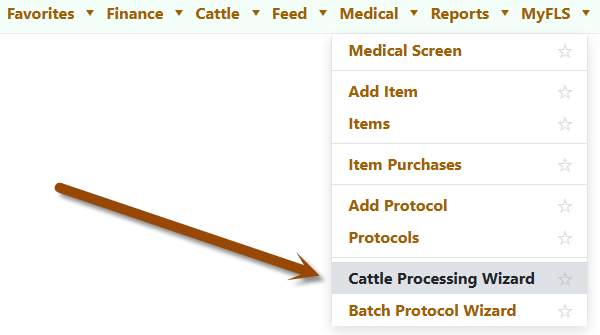
To launch, go to Medical → Cattle Processing Wizard.
Step 1 — Pick the Population
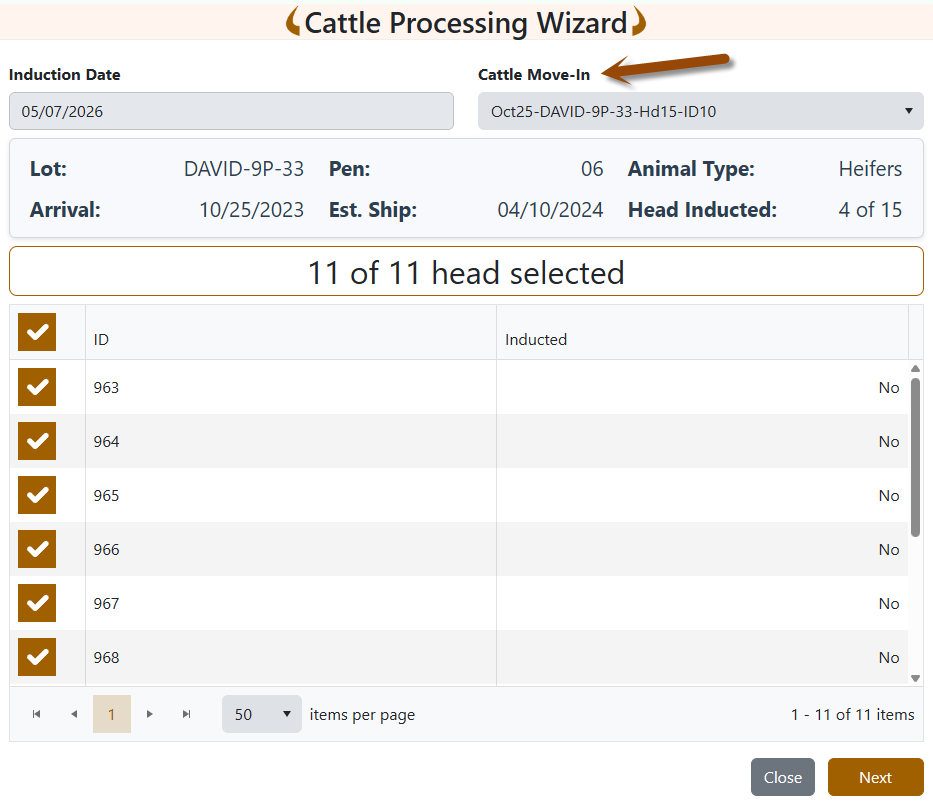
Open Medical → Cattle Processing Wizard and you land on the population page. Two fields drive everything:
- Induction Date — the date the protocol and inducted weight will be recorded against.
- Cattle Move-In — pick from the dropdown of recent purchases (formatted Date-Lot-Head-ID).
The moment you pick a move-in, the wizard:
- Loads every uninducted animal in that move-in into the grid.
- Pre-selects all of them so the default action is "induct the whole batch."
- Shows the live summary panel: Lot, current Pen(s), Animal Type, Arrival, Est. Ship, and Head Inducted so far.
Uncheck any heads you want to skip, then click Next.
Step 2 — Tag Identification
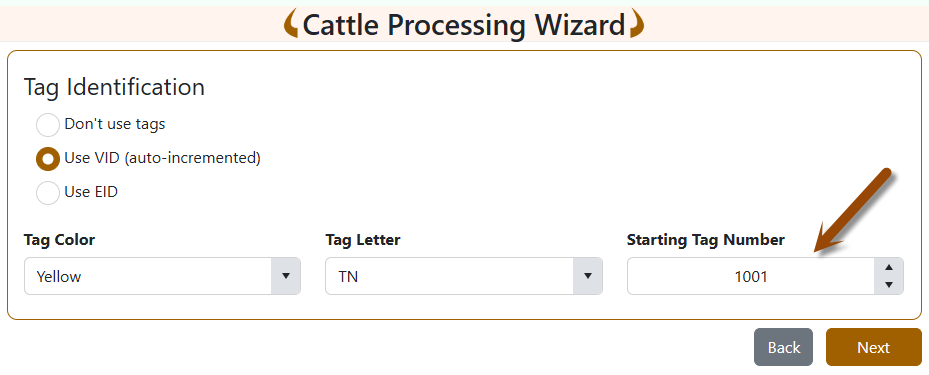
Three radio options:
- Don't use tags — straight through, no tag fields required.
- Use VID (auto-incremented) — choose Tag Color, Tag Letter, and Starting Tag Number. The wizard assigns sequential VIDs to each animal in order.
- Use EID — enter or paste your scanned EIDs, one per line.
Validation is strict and instant. For VIDs, the wizard checks the database for any conflicts in your color/letter/number range and lists offenders before letting you continue. For EIDs, it confirms each is 15 digits, that the count exactly matches the animal count, that you don't have duplicates in the paste, and that none are already on a live animal.
Step 3 — Processing Protocol (Optional)
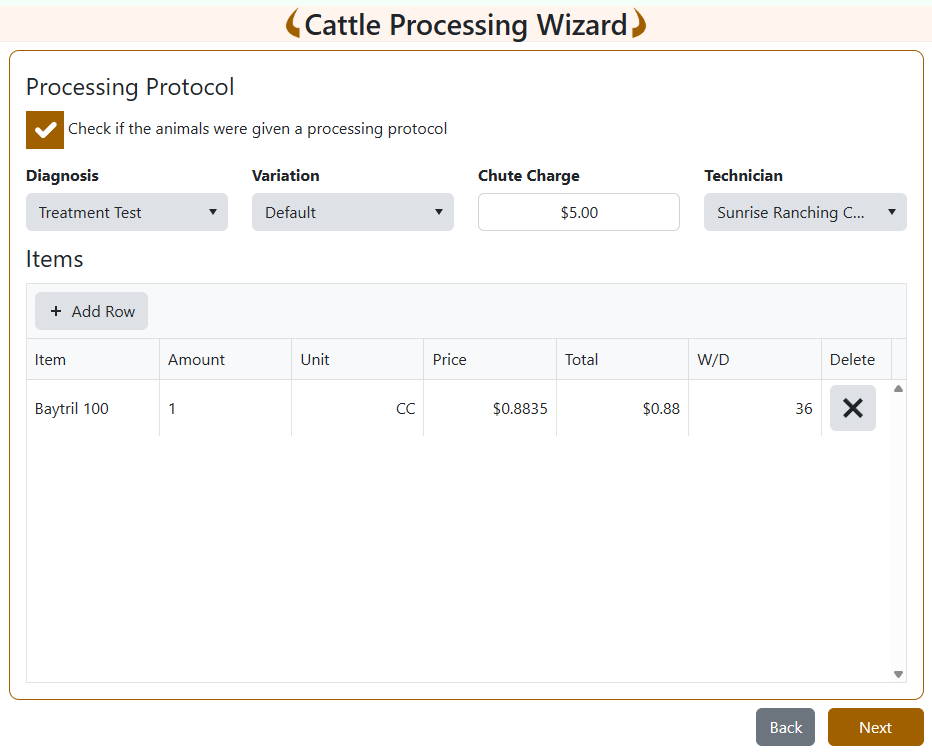
Tick "Check if the animals were given a processing protocol" to expand the protocol panel:
- Diagnosis and Variation — variation auto-loads based on diagnosis.
- Chute Charge and Technician.
- Items grid — click Add Row to add drugs. Each row needs an item and an Amount > 0; pricing, unit, and withdrawal period populate automatically from the catalog.
If you don't apply a protocol, the wizard simply inducts the animals and skips the cost summary.
Step 4 — Review and Submit
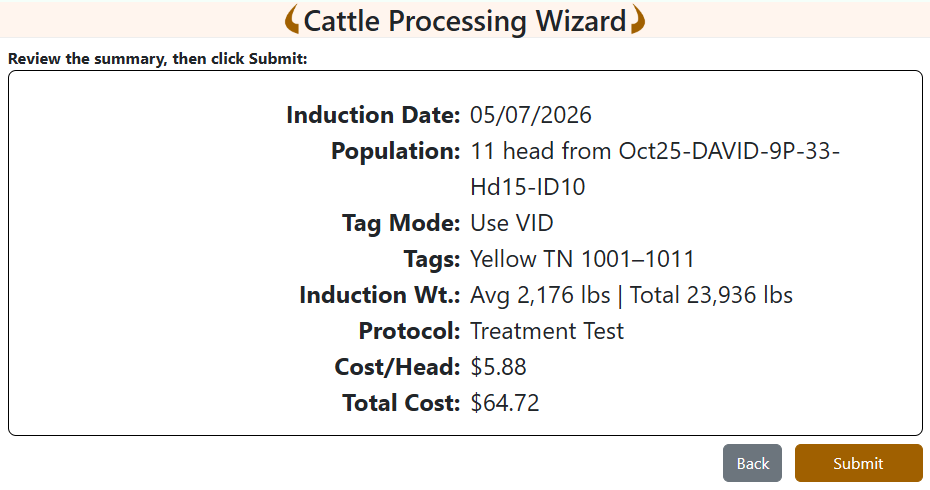
The summary page consolidates everything in one panel:
- Induction Date, Population, Tag Mode, and assigned Tags
- Induction Wt. — the wizard automatically calculates and shows Avg and Total induction weights (in lbs or kgs) using each animal's calculated weight on the induction date
- If a protocol applies: Protocol name, Cost/Head, and Total Cost
Hit Submit and the wizard:
- Inducts every selected animal on the chosen date.
- Stores each animal's calculated induction weight in the database.
- Assigns VIDs or EIDs in the order they appeared.
- Creates the protocol record, deducts drug inventory, recalculates withdrawal dates, and blocks anything that exceeds the shipping date if your settings require it.
A confirmation page lets you Process Another Batch without leaving the screen.
The bottom line
What used to be a per-head data entry chore is now a four-screen wizard with built-in safeguards. Less typing, fewer errors, faster chute throughput, and a clean audit trail on every inducted animal.
Ready to try it? Open Medical → Cattle Processing Wizard on your next induction day.
Not using FLS Cloud yet? Feedlot Solutions provides the most comprehensive, cloud-based management software for the modern beef producer. From inventory and health records to precise feed billing and custom reporting, we help you measure it so you can manage it.
Click here to schedule a demo.
Keywords: Feedlot management software, feedlot record keeping, custom feedlot billing, cattle closeout reports, feedlot closeout, cattle performance analysis, ration tracking, feed inventory, yardage billing, cattle health records, feedlot accounting, custom feeding software, grain bank, cattle medical, cattle inventory, cattle movements, cattle tag management, average daily gain, ADG, dry matter intake, DMI, feed conversion ratio, FCR, feed efficiency, gain efficiency, cost of gain, COG, break even analysis, cattle closeout report, pen closeout, lot closeout, group closeout, feedlot closeout report, cattle profit loss, cattle margin analysis, cattle weight gain tracking, cattle average weight, cattle shrink, cattle days on feed, DOF, cattle projected finish date, feed management software, feed inventory software, feed tracking software, feed delivery records, feed consumption tracking, feed cost tracking, feed ingredient inventory, ration management, ration tracking, ration formulation, ration cost, ration changes, ration history, daily feed records, feed bunk management, bunk reading, feed call, feed sheets, feed tickets, feed usage reports, ingredient usage, feed mixing records, TMR records, total mixed ration, feed truck records, feed scale integration, scale head data import, Cattle accounting software, feedlot accounting software, cattle billing software, cattle invoice software, feedlot invoice, feedlot customer billing, owner billing, cattle owner statements, yardage billing, feed billing, medicine billing, processing charges, transportation charges, trucking charges, cattle purchase expense, cattle sale settlement, feedlot receivables, feedlot payables, feedlot financial reports, cattle cost reports, cattle expense reports, feedlot profitability
Comments