

.png?width=1448&height=1086&name=Feedlot%20Solutions%20(45).png)
FLS Cloud now builds Elanco's Experior Manual Data Entry Form straight from your feeding, health, and inventory records — preview it, then email it, without touching a spreadsheet.
If your yard is feeding Experior, you already know the drill. Every week, someone has to sit down and rebuild Elanco's Manual Data Entry Form: one row for every lot, for every single day on product. Thirty columns wide.
And the data for those thirty columns isn't sitting in one place. Head counts come from your lot records. Pulls and deads come from the treatment side, sorted into Elanco's five categories. Feed weights and dry matter come from the feed calls. Pen numbers change the day cattle get moved. Somebody has to pull it all together, line it up by date, and get it right — because a wrong pen number or a missing day means the file comes back rejected.
That's an hour of careful work, every week, that produces nothing new. It just moves numbers you already have from one place to another.
FLS Cloud now does it for you.
Launch here
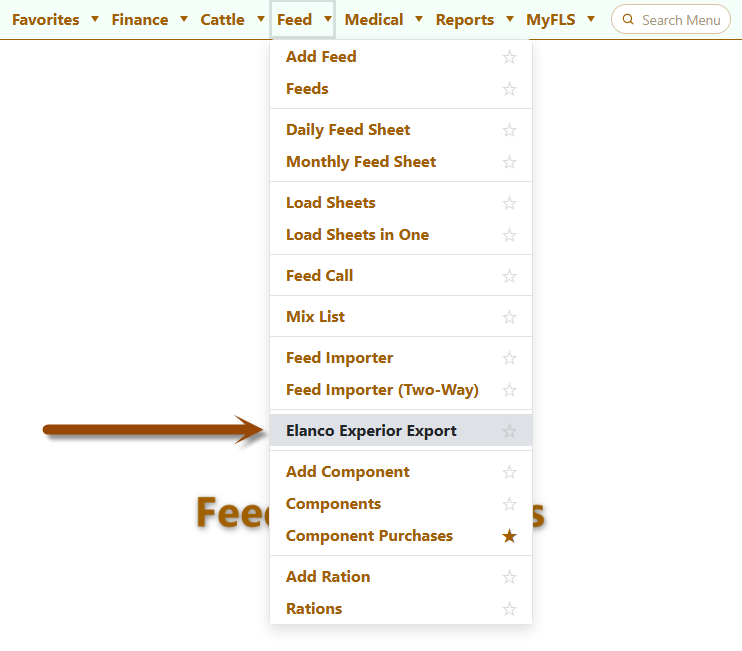
Pick a week. Preview. Send.
The new Elanco Experior Export screen lives under your Feed menu. The whole workflow is three steps:
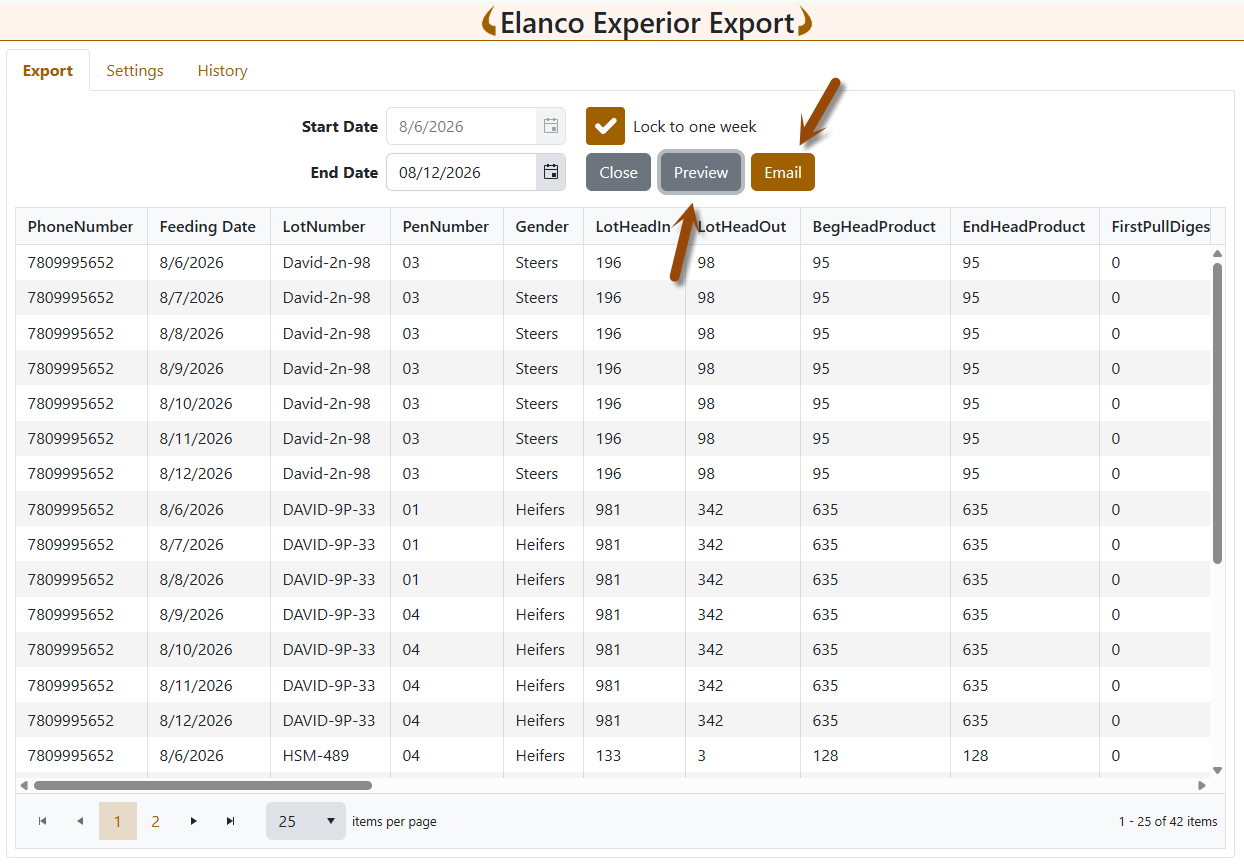
- Choose your date range. There's a "Lock to one week" option, since most yards report weekly — check it once and the end date follows your start date automatically.
- Hit Preview. You see the actual file, on screen, in a grid: every row, all thirty columns, exactly as Elanco will receive it.
- Hit Email. A preview of the message opens up — recipient, subject, the attached CSV — and you click Send Now.
The key word there is preview. You're not sending a black box and hoping. You look at the numbers first, and they're the same numbers already in your system, so anything that looks off is something you can go fix at the source.
Set it up once
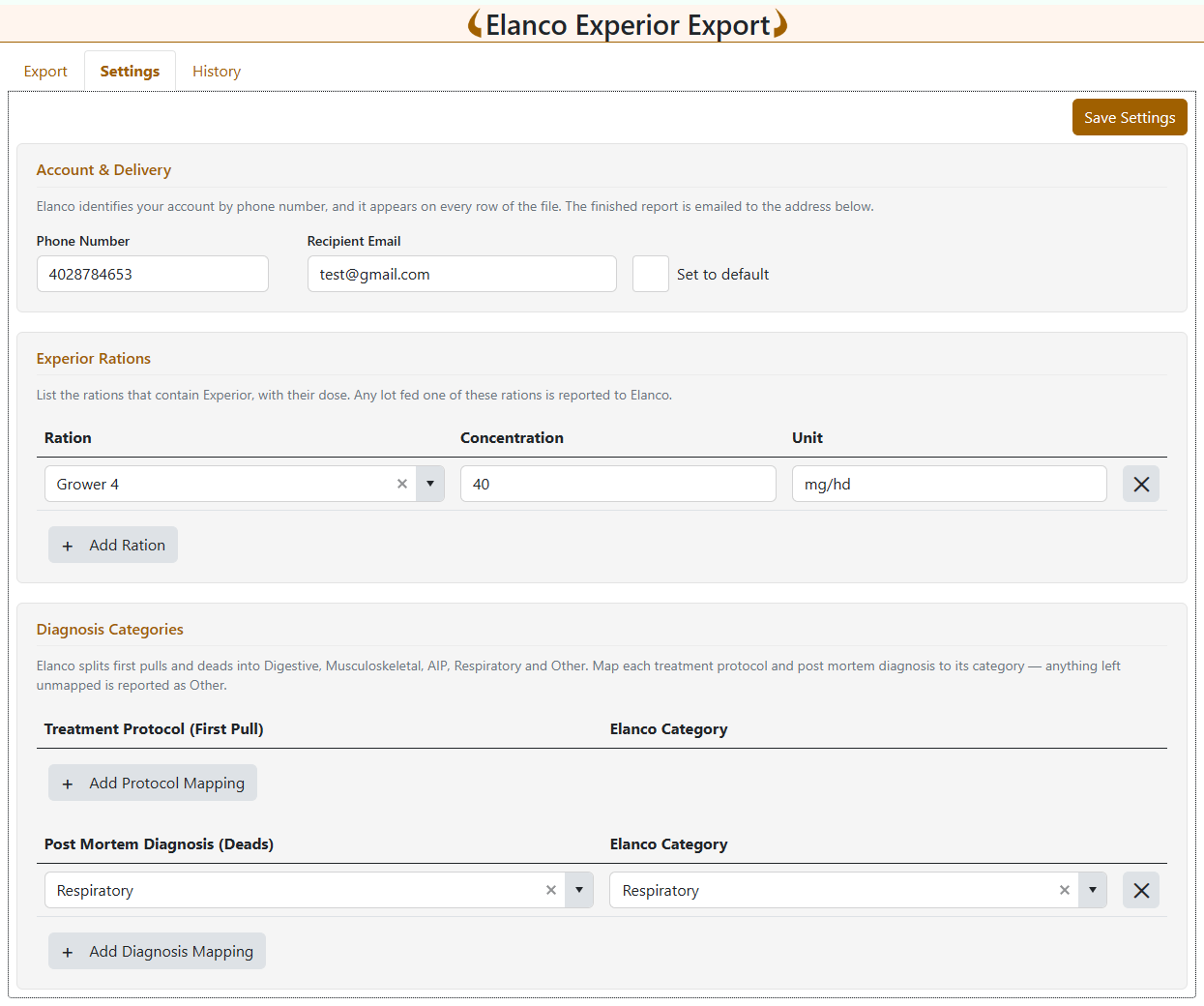
Under the Settings tab, you tell FLS Cloud four things:
- Your contact phone number and where the report goes at Elanco
- Which of your rations contain Experior, along with the concentration and units for each
- How your pull categories map to Elanco's five buckets — Digestive, Musculoskeletal, AIP, Respiratory, and Other
- How your death categories map to those same five buckets
That's it. Anything you don't explicitly map falls into Other, so nothing gets silently dropped. Do this once and every future report builds itself.
The details it handles for you
This is where hand-built spreadsheets usually go wrong, and it's the part we spent the most time on:
- Only lots actually on product appear in the file — a lot that shipped out before your reporting window doesn't generate empty rows.
- Pen transfers are picked up mid-period, with the correct start and end pen recorded on the day the cattle moved.
- Product start and end dates are stamped on the right rows, including the first day a lot comes off product.
- Concentration and units are resolved per day, not per lot — so if a lot switches rations partway through the week, each day reports what that lot actually ate.
- Feed weights, formulated DM, and total dry pounds come straight off the feed calls that were already delivered.
A record of what you sent
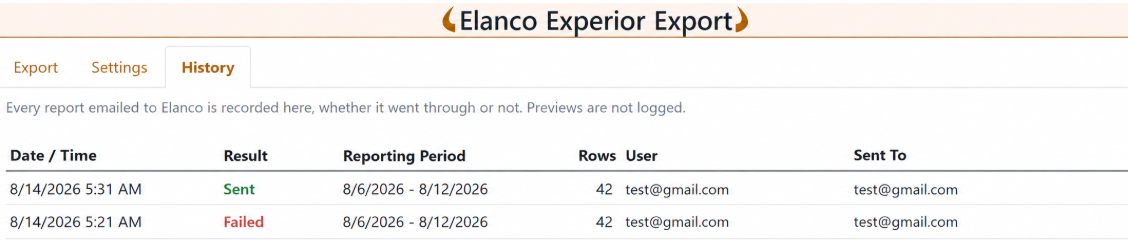
The History tab keeps a log of every report that leaves your yard: the date and time, who sent it, the reporting period it covered, and whether it went through. When someone asks six weeks from now whether the June 12th file was submitted, you have an answer in about four seconds.
Every email also carries your feedlot name in the subject line, so there's never any question on Elanco's end about which yard a file came from.
Available now
The Elanco Experior Export is live in FLS Cloud. If you're feeding Experior and you'd like a hand with the initial ration and category setup, get in touch — it's a ten-minute conversation and then the weekly report stops being your problem.
Questions? Reach the team at support@feedlotsolutions.com.
.
Not using FLS Cloud yet? Feedlot Solutions provides the most comprehensive, cloud-based management software for the modern beef producer. From inventory and health records to precise feed billing and custom reporting, we help you measure it so you can manage it.
Click here to schedule a demo.
Keywords: Feedlot management software, feedlot record keeping, custom feedlot billing, cattle closeout reports, feedlot closeout, cattle performance analysis, ration tracking, feed inventory, yardage billing, cattle health records, feedlot accounting, custom feeding software, grain bank, cattle medical, cattle inventory, cattle movements, cattle tag management, average daily gain, ADG, dry matter intake, DMI, feed conversion ratio, FCR, feed efficiency, gain efficiency, cost of gain, COG, break even analysis, cattle closeout report, pen closeout, lot closeout, group closeout, feedlot closeout report, cattle profit loss, cattle margin analysis, cattle weight gain tracking, cattle average weight, cattle shrink, cattle days on feed, DOF, cattle projected finish date, feed management software, feed inventory software, feed tracking software, feed delivery records, feed consumption tracking, feed cost tracking, feed ingredient inventory, ration management, ration tracking, ration formulation, ration cost, ration changes, ration history, daily feed records, feed bunk management, bunk reading, feed call, feed sheets, feed tickets, feed usage reports, ingredient usage, feed mixing records, TMR records, total mixed ration, feed truck records, feed scale integration, scale head data import, Cattle accounting software, feedlot accounting software, cattle billing software, cattle invoice software, feedlot invoice, feedlot customer billing, owner billing, cattle owner statements, yardage billing, feed billing, medicine billing, processing charges, transportation charges, trucking charges, cattle purchase expense, cattle sale settlement, feedlot receivables, feedlot payables, feedlot financial reports, cattle cost reports, cattle expense reports, feedlot profitability
Comments