

Stop Posting Load Sheets One at a Time
Daily feeding is important, but posting each load sheet individually can take extra time.
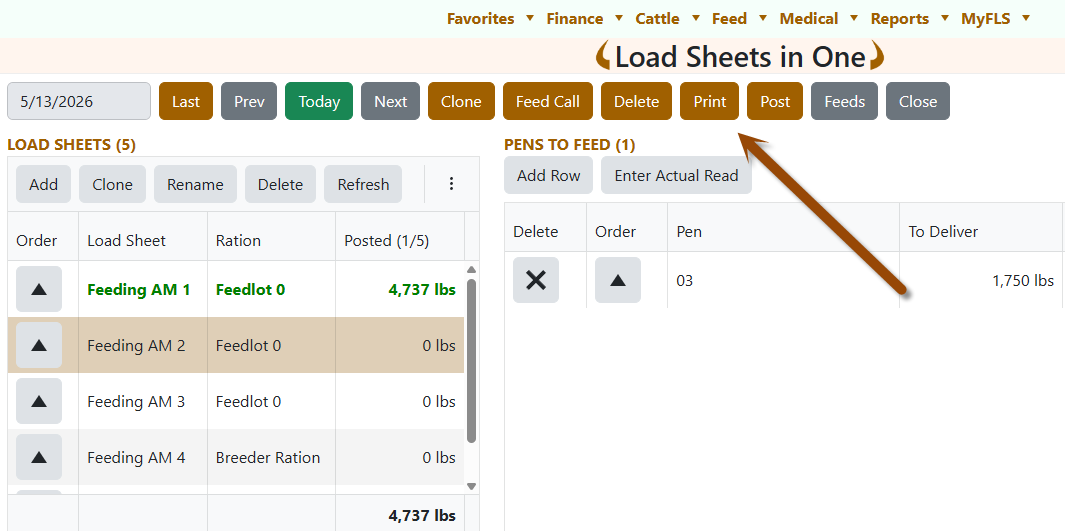
That is why we added a new Post button to Load Sheets in One. It lets you post all ready load sheets for the selected date in one step.
What is the New Post Button?
The Post button is located at the top of Load Sheets in One, between Print and Feeds.
When clicked, FLS Cloud checks all load sheets for the selected feed date and posts the ones that are ready. If some load sheets were already posted, they are skipped automatically.
How It Works
1. Select the Feed Date
Go to:
Feed → Load Sheets in One
Choose the date you want to post.
2. Review the Load Sheets
Check that the pens and feed amounts are correct.
If Delivered Amount is entered, FLS Cloud uses it. If it is blank, FLS Cloud uses the To Deliver amount instead.
3. Click Post
Click Post and confirm.
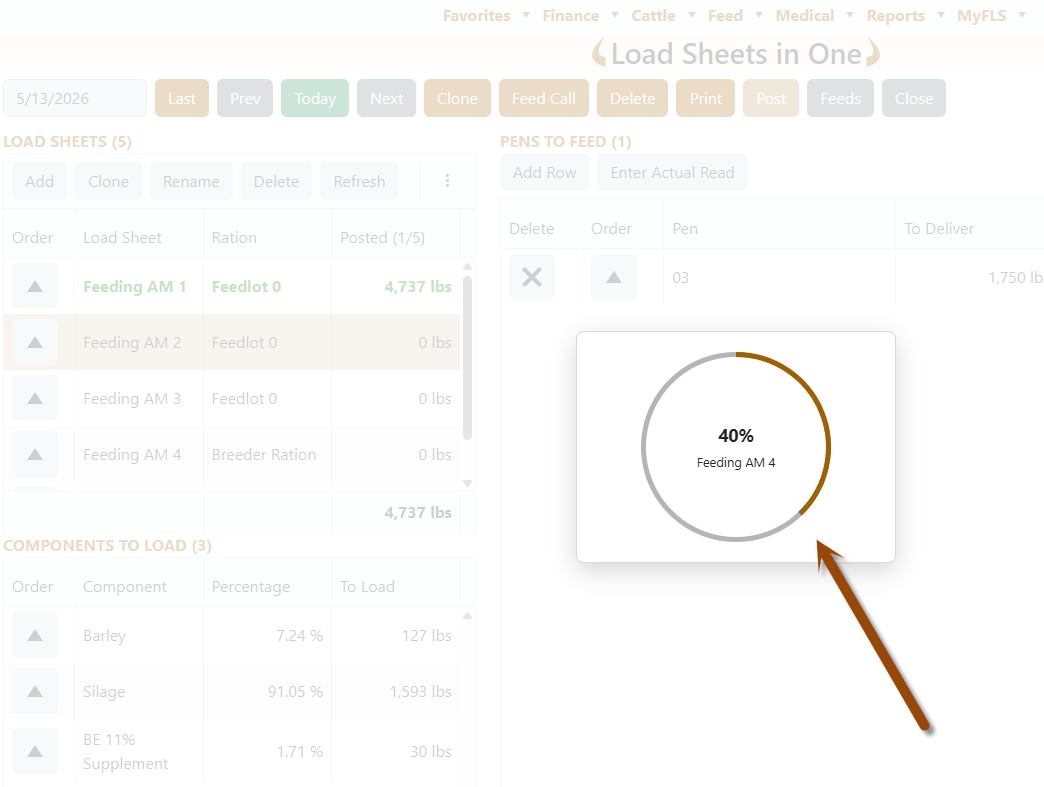
Posting may take up to a minute depending on how many load sheets are included.
4. Watch the Progress
A progress circle shows the load sheet currently being processed and the real server progress. When posting and saving are finished, it shows 100% Complete.
Why This Matters for Your Feedlot
- Save Time: Post multiple load sheets in one step.
- Reduce Repeated Clicks: No need to open each load sheet individually.
- Avoid Duplicate Posting: Already posted load sheets are skipped.
- Keep Feed Records Cleaner: Delivered Amount is used when available; otherwise To Deliver is used.
Not using FLS Cloud yet? Feedlot Solutions provides the most comprehensive, cloud-based management software for the modern beef producer. From inventory and health records to precise feed billing and custom reporting, we help you measure it so you can manage it.
Click here to schedule a demo.
Keywords: Feedlot management software, feedlot record keeping, custom feedlot billing, cattle closeout reports, feedlot closeout, cattle performance analysis, ration tracking, feed inventory, yardage billing, cattle health records, feedlot accounting, custom feeding software, grain bank, cattle medical, cattle inventory, cattle movements, cattle tag management, average daily gain, ADG, dry matter intake, DMI, feed conversion ratio, FCR, feed efficiency, gain efficiency, cost of gain, COG, break even analysis, cattle closeout report, pen closeout, lot closeout, group closeout, feedlot closeout report, cattle profit loss, cattle margin analysis, cattle weight gain tracking, cattle average weight, cattle shrink, cattle days on feed, DOF, cattle projected finish date, feed management software, feed inventory software, feed tracking software, feed delivery records, feed consumption tracking, feed cost tracking, feed ingredient inventory, ration management, ration tracking, ration formulation, ration cost, ration changes, ration history, daily feed records, feed bunk management, bunk reading, feed call, feed sheets, feed tickets, feed usage reports, ingredient usage, feed mixing records, TMR records, total mixed ration, feed truck records, feed scale integration, scale head data import, Cattle accounting software, feedlot accounting software, cattle billing software, cattle invoice software, feedlot invoice, feedlot customer billing, owner billing, cattle owner statements, yardage billing, feed billing, medicine billing, processing charges, transportation charges, trucking charges, cattle purchase expense, cattle sale settlement, feedlot receivables, feedlot payables, feedlot financial reports, cattle cost reports, cattle expense reports, feedlot profitability
Comments