
Say goodbye to manual birthdate lookups! We've added a slick new feature to the Medical Screen that automatically fetches an animal's birthdate from the CLTS (Canadian Livestock Tracking System) the moment you scan or type in an EID tag.
How It Works
- You scan or type a 15-digit EID on the Medical Screen.
- FLS Cloud instantly talks to the CLTS API behind the scenes.
- The Birth Date field fills itself in. ✨
That's it. No extra steps. No switching between apps. It just works.
Setting It Up
Step 1: Make Sure Your CLTS Credentials Are Set
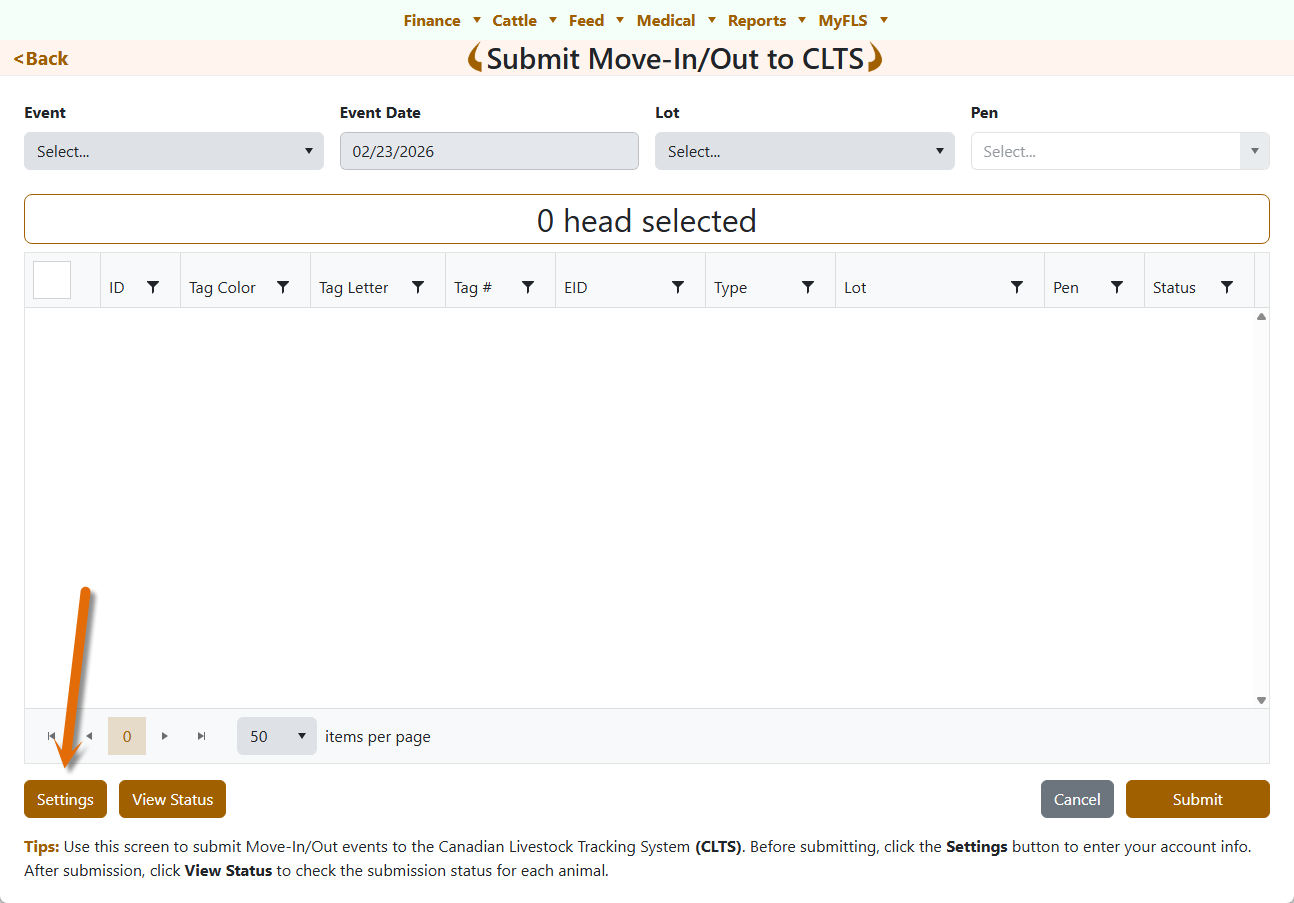
Your CLTS account credentials (username, password, account ID, premises ID) are managed on the Move-In/Out Submission screen.
👉 Navigate to Cattle → Move-In/Out Submission and make sure your CLTS credentials are filled in and saved. If you've already been submitting move-in/move-out events to CLTS, you're good to go — the same credentials are reused.
Step 2: Enable Auto-Pull on the Medical Screen
- Open the Medical Screen.
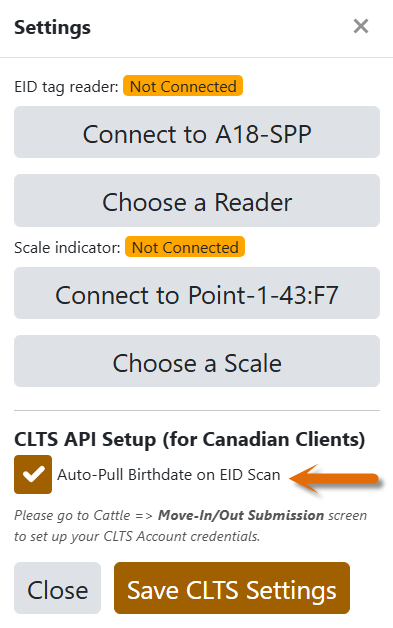
- Tap the ⚙️ Settings button (the gear icon on the toolbar).
- Scroll down to the "CLTS API Setup (for Canadian Clients)" section.
- Check ✅ the "Auto-Pull Birthdate on EID Scan" box.
- Hit "Save CLTS Settings".
Done! Close the settings and you're ready to roll.
Using It Day-to-Day
When Inducting a New Animal
- Tap Induct Animal to open the animal form.
- Scan an EID tag with your Bluetooth reader, or type it in manually.
- The moment a valid 15-digit EID is detected, the system queries CLTS.
- If a birthdate is found, the Birth Date picker fills in automatically.
When Editing an Existing Animal
- Open the animal's edit form.
- Update or re-scan the EID.
- Same thing — birthdate auto-populates if available.
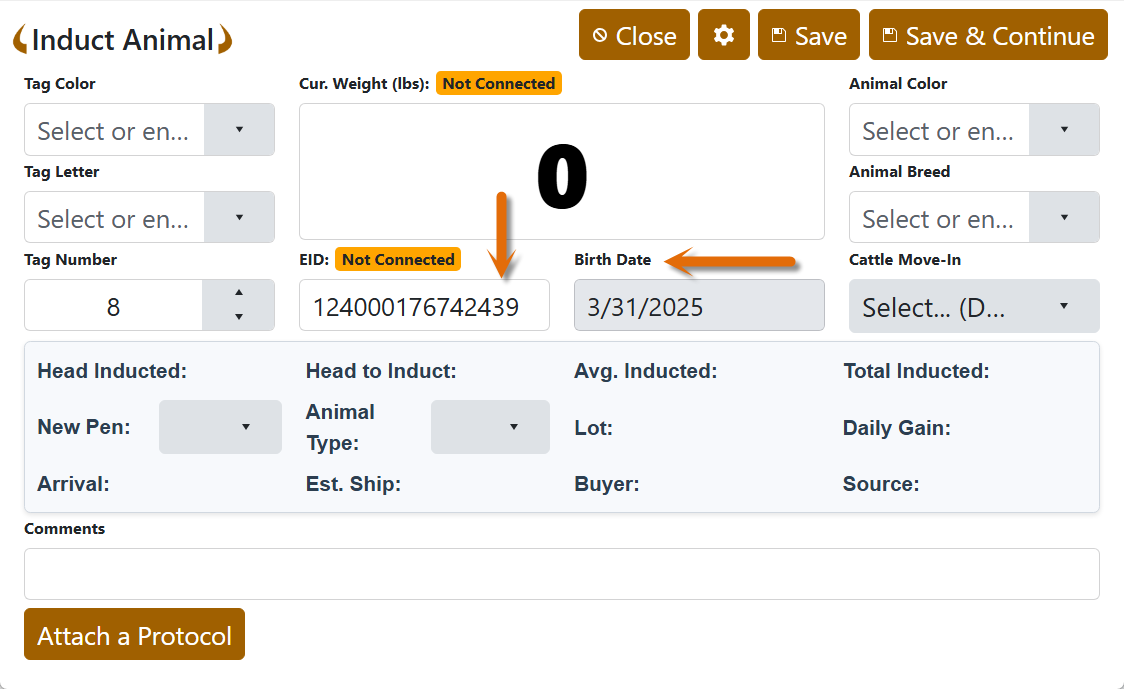
💡 Tip: If the CLTS doesn't have a birthdate on file for that tag, the Birth Date field will simply stay empty. No errors, no fuss.
FAQ
Q: Do I need to be connected to the internet?
A: Yes — the feature queries the CLTS servers in real time, so an active internet connection is required.
Q: Will this slow down my scanning workflow?
A: Not at all. The API call runs in the background. You can keep working while it fetches the data.
Q: What if I don't use CLTS?
A: No worries! Simply leave the checkbox unchecked in Settings. The feature is completely optional and won't affect your workflow if it's disabled.
Q: Does it work with all readers?
A: Yes — Bluetooth readers, HID-mode scanners, and even manual keyboard input all trigger the auto-pull.
Wrapping Up
This feature is all about saving you time and reducing manual data entry errors. One scan, one birthdate, zero hassle.
If you run into any issues or have questions, don't hesitate to reach out to our support team. Happy scanning!
Not using FLS Cloud yet? Feedlot Solutions is pioneering the use of artificial intelligence in beef production. If you want software that does more than just hold data, you need FLS Cloud.
Click here to schedule a demo.
Keywords: Feedlot management software, feedlot record keeping, custom feedlot billing, cattle closeout reports, feedlot closeout, cattle performance analysis, ration tracking, feed inventory, yardage billing, cattle health records, feedlot accounting, custom feeding software, grain bank, cattle medical, cattle inventory, cattle movements, cattle tag management, average daily gain, ADG, dry matter intake, DMI, feed conversion ratio, FCR, feed efficiency, gain efficiency, cost of gain, COG, break even analysis, cattle closeout report, pen closeout, lot closeout, group closeout, feedlot closeout report, cattle profit loss, cattle margin analysis, cattle weight gain tracking, cattle average weight, cattle shrink, cattle days on feed, DOF, cattle projected finish date, feed management software, feed inventory software, feed tracking software, feed delivery records, feed consumption tracking, feed cost tracking, feed ingredient inventory, ration management, ration tracking, ration formulation, ration cost, ration changes, ration history, daily feed records, feed bunk management, bunk reading, feed call, feed sheets, feed tickets, feed usage reports, ingredient usage, feed mixing records, TMR records, total mixed ration, feed truck records, feed scale integration, scale head data import, Cattle accounting software, feedlot accounting software, cattle billing software, cattle invoice software, feedlot invoice, feedlot customer billing, owner billing, cattle owner statements, yardage billing, feed billing, medicine billing, processing charges, transportation charges, trucking charges, cattle purchase expense, cattle sale settlement, feedlot receivables, feedlot payables, feedlot financial reports, cattle cost reports, cattle expense reports, feedlot profitability
Comments