

We are committed to providing you with the most transparent and detailed billing in the industry. Our new Invoice format: Invoice (Component) is now live, offering a deep dive into your feed consumption and costs.
Here is everything you need to know to read and use this report effectively in under 3 minutes.
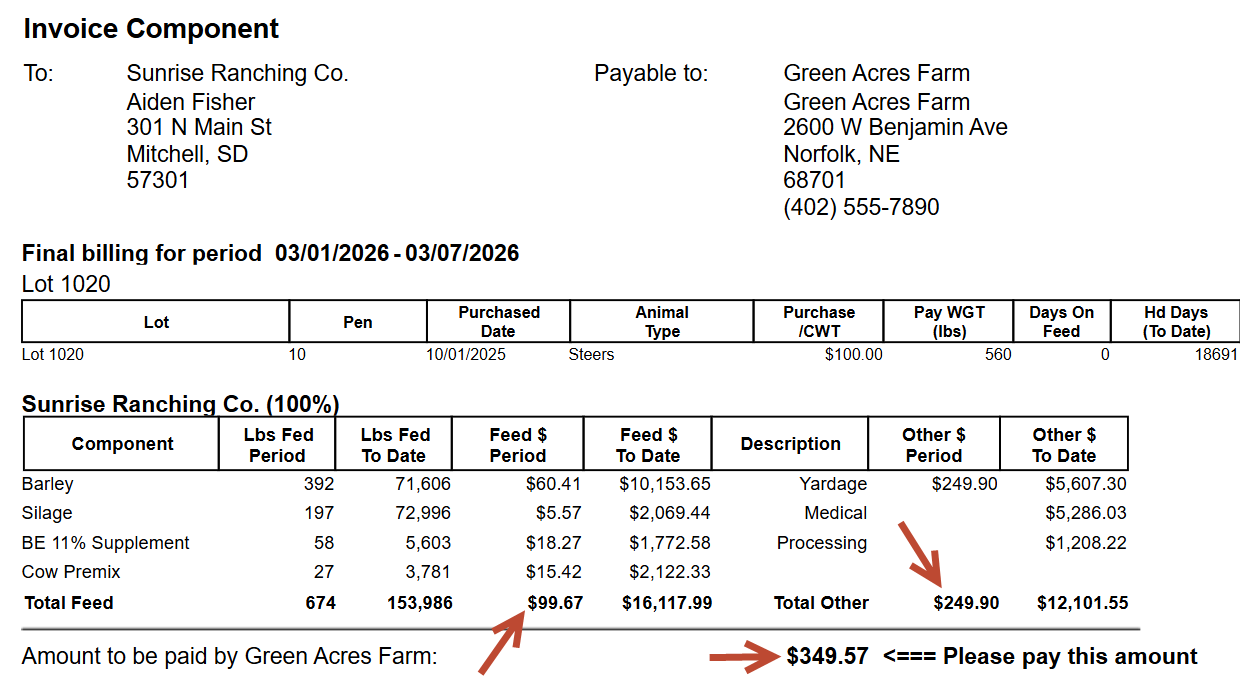
1. The Header: At-a-Glance Lot Performance
The top section summarizes your Lot’s status for the billing period (e.g., 01/01/2026 - 01/31/2026).
- Purchased Date & Pay WGT: Tracks the origin and initial weight of the animals.
- Days On Feed: Shows exactly how long the lot has been in our care.
- Live/Head Count: Provides a real-time audit of Head In, Dead, Sold, and the current headcount.
2. The Data Grid: Component-Level Data
This is the heart of the new format. Unlike summary invoices, this report breaks down every single feed ingredient (Distillers, Syrup, Corn, etc.).
- Period Columns: Show the exact pounds and dollar amount consumed only within this billing cycle.
- To Date Columns: Show the cumulative consumption and cost since the lot arrived.
- Finance Charges & Yardage: These are now listed clearly as separate line items, ensuring you aren't guessing where "Other" charges come from.
3. Grain Bank & Deductions
If you use a Grain Bank, the new report provides a dedicated section to show how your credits are applied:
- As Fed vs. DM: We show exactly how many pounds of component bank were used on both an "As Fed" and "Dry Matter" basis.
- Cost Deductions: Clearly labeled as "at our cost" or "at your cost," showing the exact offset applied to your total bill.
4. Simplified Footers & Tax Compliance
We’ve improved the wording in the final section to make your payment process seamless:
- Sales Tax & BN: If applicable, sales tax is calculated transparently, with our Business Number (BN) listed right next to it for your tax records.
- Early Payment Incentives:
- Discount if paid by [Date]: Prominently shows the deadline and exact savings you can earn.
- Total after discount: The final, reduced amount you need to pay if you choose to take advantage of the early payment option.
5. Quick Pro-Tips for Using the Report
- Digital Access: This report is optimized for the Telerik Report Viewer, meaning you can export it to PDF or Excel with a single click for your own record-keeping.
6. How to launch
- Go to Menu Reports => Receivables => Invoice (Component)
Not using FLS Cloud yet? Feedlot Solutions is pioneering the use of artificial intelligence in beef production. If you want software that does more than just hold data, you need FLS Cloud.
Click here to schedule a demo.
Keywords: Feedlot management software, feedlot record keeping, custom feedlot billing, cattle closeout reports, feedlot closeout, cattle performance analysis, ration tracking, feed inventory, yardage billing, cattle health records, feedlot accounting, custom feeding software, grain bank, cattle medical, cattle inventory, cattle movements, cattle tag management, average daily gain, ADG, dry matter intake, DMI, feed conversion ratio, FCR, feed efficiency, gain efficiency, cost of gain, COG, break even analysis, cattle closeout report, pen closeout, lot closeout, group closeout, feedlot closeout report, cattle profit loss, cattle margin analysis, cattle weight gain tracking, cattle average weight, cattle shrink, cattle days on feed, DOF, cattle projected finish date, feed management software, feed inventory software, feed tracking software, feed delivery records, feed consumption tracking, feed cost tracking, feed ingredient inventory, ration management, ration tracking, ration formulation, ration cost, ration changes, ration history, daily feed records, feed bunk management, bunk reading, feed call, feed sheets, feed tickets, feed usage reports, ingredient usage, feed mixing records, TMR records, total mixed ration, feed truck records, feed scale integration, scale head data import, Cattle accounting software, feedlot accounting software, cattle billing software, cattle invoice software, feedlot invoice, feedlot customer billing, owner billing, cattle owner statements, yardage billing, feed billing, medicine billing, processing charges, transportation charges, trucking charges, cattle purchase expense, cattle sale settlement, feedlot receivables, feedlot payables, feedlot financial reports, cattle cost reports, cattle expense reports, feedlot profitability
Comments